Join us Aug. 26, 1PM EDT for "Data-Driven Marketing in the Age of AI." Learn More

When a device goes offline at a customer site, a Snowflake pipeline can check whether the power is out and send the answer to a service assurance analyst before anyone picks up the phone. DAS42, a Snowflake Elite Services Partner, built that pipeline for a large managed services provider, and it runs entirely inside Snowflake. Snowpipe, dynamic tables, streams, and triggered tasks move the data from file landing to outbound API call with no external orchestration tool. This post walks through the build – one object at a time.
The problem: confirming power status for every device alert
A large managed services provider needed to know whether a customer site had lost power within minutes of a device alert. Its service assurance team was finding out by calling customers directly.
Service assurance is a core part of this provider’s product. The team’s job is to keep customer devices online and connected. When a device goes down, it sends an alert to an AI Ops platform built for incident management and monitoring. The platform adds context to each raw alert, such as customer details, location, and alert time. It then groups related alerts into a single incident, so the team sees one view of what is happening at a site.
Enriching and grouping alerts cuts the noise, but it still leaves open the first question the team asks about a new alert: Is the power up or down at that site? Calling the customer to find out is slow, and it breaks down when a storm takes out power across a region. DAS42 replaced the call with a Snowflake pipeline that checks a power outage data service and posts the answer back to AI Ops.
Which Snowflake objects run the pipeline
- Snowpipe detects new files in a stage and loads them as soon as they arrive.
- Dynamic tables pick up the newly loaded data and reshape it into a structured format.
- Streams track changes to the dynamic table so downstream steps act only on new rows.
- Triggered tasks run when the stream has new data, with no schedule to manage.
- Stored procedures define the action the task takes.
- External access integrations (optional) let a stored procedure call a service outside Snowflake, when that call is the action you need.
Snowflake documents this pattern, in which a dynamic table feeds a stream that fires a triggered task. It covers work a dynamic table can’t do on its own, such as calling a stored procedure or an external API. See Snowflake’s guide to using streams on dynamic tables.
How the Snowflake data pipeline works, step by step
Alert files land in cloud storage, and Snowflake loads and reshapes them. Each new row then fires a stored procedure that calls the outage API and sends the result back to AI Ops. The steps below follow the data in order.
Step 1: Load alert files with Snowpipe
Alert data from AI Ops lands in an Azure storage container in real time. Snowpipe detects each new file in the external stage and loads the semi-structured data into a Snowflake table.
A notification integration connects Snowflake to a third-party messaging service. In this build, that service is Azure Storage Queue. The notification integration tells Snowpipe a file has arrived, and Snowpipe copies the file’s contents into the raw table.

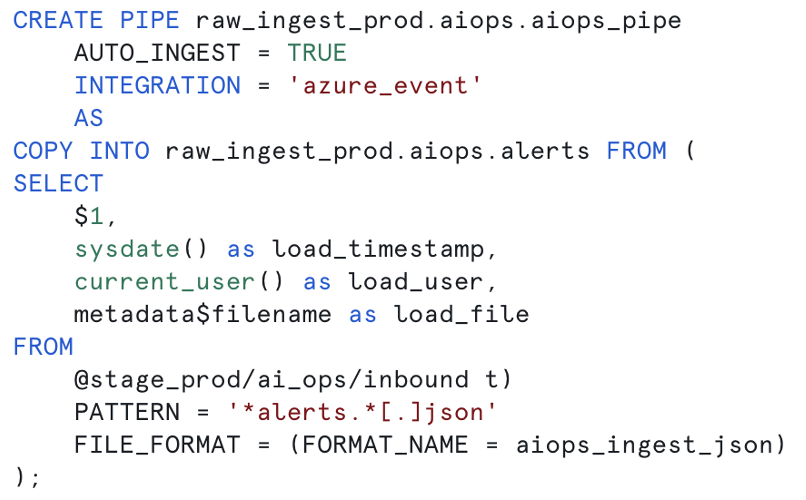
Step 2: Reshape the raw JSON with a dynamic table
A dynamic table defined on the raw table unpacks the JSON and applies the other transformations the pipeline needs. Dynamic tables suit this job because Snowflake tracks their upstream tables and refreshes them when the source data changes.
Target lag controls freshness. Target lag is the maximum staleness you will accept, and Snowflake schedules refreshes to stay within it on a best-effort basis. The shortest target lag Snowflake allows is 60 seconds. For an alert pipeline, set the lag to match how fast the team needs an answer.
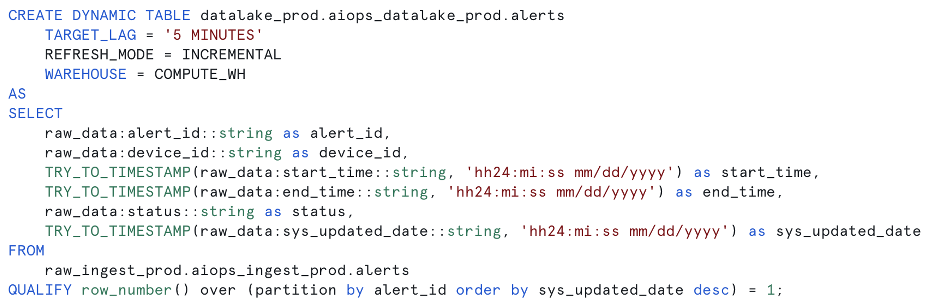
Step 3: Capture new rows with a stream
A stream on the dynamic table records each insert, update, and delete, plus metadata about the change. The pipeline uses new records in the stream to fire a task, so work happens only when there is new data to act on.

Step 4: Set up the external access integration
The task runs a stored procedure that calls a power outage data API, which returns the power status at a given location. Before Snowflake can make that call, these objects need to exist:
- A network rule, which allows outbound requests from Snowflake and limits them to the domains you specify.
- A secret, which stores API tokens and credentials securely. Snowflake supports several authentication methods. This build stores a token in a generic string secret.
- An external access integration, which combines the network rule and any secrets into one approved external connection.

Step 5: Call the API from a stored procedure
With the stream and external access integration in place, the stored procedure calls the outage service. A triggered task runs the procedure whenever the stream has new rows. By default, triggered tasks run at most every 30 seconds, and they use no compute until there is data to process. Snowflake’s triggered tasks documentation covers the setup options.
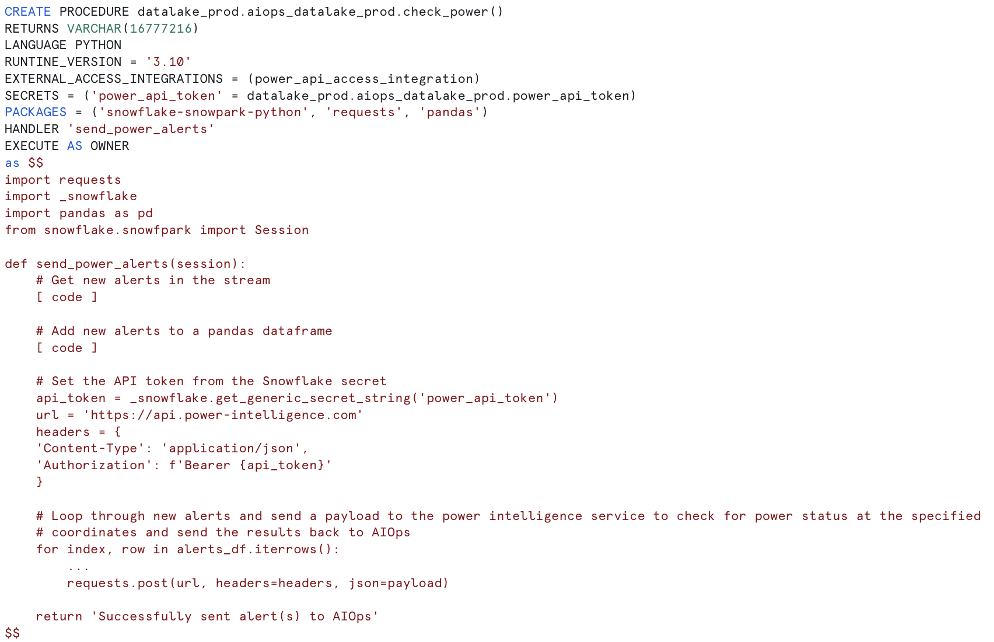
Step 6: Send the answer back to AI Ops
The stored procedure posts the power status back to AI Ops as a new alert. AI Ops adds customer and location details to that alert, using the device information the pipeline sent. With those details attached, AI Ops groups the power alert with the original device alert that started the pipeline.
The service assurance team now sees the power status at a location within minutes of the first alert. No one has to call the customer to ask.
What the pipeline showed during Hurricanes Helene and Milton
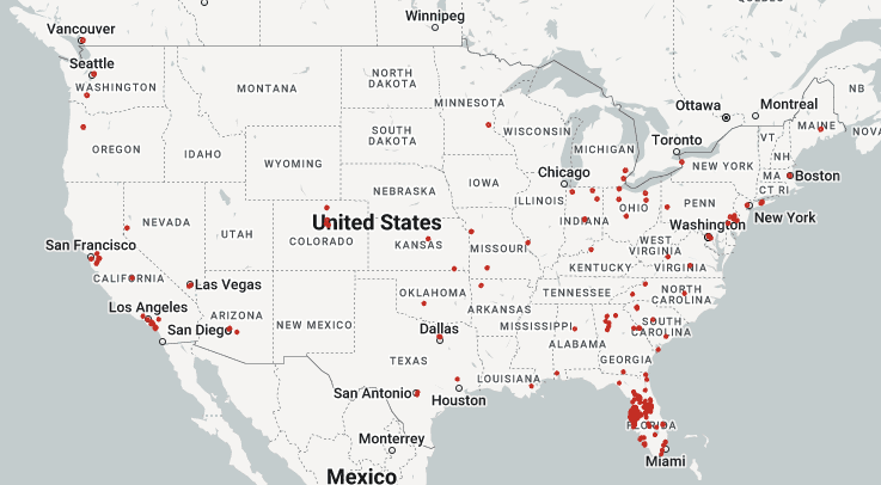
The pipeline was running when Hurricane Helene and Hurricane Milton hit the southeastern U.S. in fall 2024. The maps below plot the power outage alerts it generated across the country during each storm.
Hurricane Helene

Hurricane Milton
Where this Snowflake automation pattern fits beyond outage alerts
The pattern fits any pipeline where a new record should set off an action, such as a lookup, an API call, or a write to another system. Running that pipeline in Snowflake keeps ingestion, transformation, and orchestration under one set of permissions instead of spread across separate tools.
Network operations teams in telecommunications are a natural fit. Their alert data already flows through a NOC, and each new alert can be checked against outside data before an analyst touches it. Checks like that cut the number of alerts that need a person. DAS42 builds these pipelines as part of its Data Engineering <link> work. Alert triage at network scale is the focus of AI Acceleration & Intelligent ITSM <link>.
Snowflake-native pipelines have limits. Dynamic tables can’t refresh faster than the 60-second minimum target lag. A pipeline that depends on systems outside Snowflake may still need an external orchestrator. Plan for those cases before you commit to the design.
Frequently asked questions
Can you build a data pipeline entirely in Snowflake?
Yes. Snowpipe loads files as they land, dynamic tables transform the data, streams track new rows, and triggered tasks run stored procedures when changes appear. External access integrations let those procedures call outside APIs. Together, these objects cover ingestion, transformation, orchestration, and outbound actions without leaving the Snowflake cloud or adding a separate orchestration tool.
What is the difference between dynamic tables and streams and tasks?
Dynamic tables are declarative: You write a SELECT query and set a target lag, and Snowflake handles the refreshes. Streams and tasks are imperative: A stream records row changes, and a task runs code when those changes appear. Use dynamic tables for transformations, and use streams with tasks for actions like API calls or conditional logic.
How fast does a Snowflake pipeline respond to new data?
A Snowflake pipeline built this way responds as fast as its slowest step. Snowpipe loads files shortly after they land, dynamic tables refresh within a target lag that can be as short as 60 seconds, and triggered tasks run at most every 30 seconds by default. In the pipeline described here, the team sees power status within minutes of an alert.
When do you need an external access integration in Snowflake?
You need an external access integration when code running in Snowflake, such as a stored procedure or user-defined function, has to call a service outside Snowflake. The integration combines a network rule, which limits the domains Snowflake can reach, with secrets that store credentials. Pipelines that only move data within Snowflake don’t need one.
Do you still need Airflow or another orchestrator with Snowflake automation?
Often not, if the whole pipeline lives in Snowflake. Triggered tasks and dynamic tables handle event-driven runs and dependency order on their own. An external orchestrator still earns its place when a pipeline has to coordinate steps in systems outside Snowflake, such as upstream applications or downstream tools that run on their own schedules.
If your service assurance team still confirms outages by phone, we can build this pipeline on your alert data. Talk to our team about your alert pipeline.


Services provided



Start maximizing your data’s full potential.
FREE CONSULTATION